Agent Skill: DH AG95
This example shows how to use the
dobot-plusskill to adapt the DH-Robotics AG-95 electric gripper. Instead of hand-writing Lua, HTTP APIs, and UI, the Skill generates scaffolding fromdoc.mdin the project root—prepare the protocol document and invoke/dobot-plusin the IDE.
Workflow
Environment Setup
See Development Environment for details.
| Dependency | Version / Notes |
|---|---|
| Node.js | v20 or later |
| IDE | Agent Skills support (e.g. Cursor) |
| @dobot-plus/cli | Global dpt |
| @dobot-plus/skill | Global /dobot-plus |
npm install -g @dobot-plus/cli @dobot-plus/skill@latest
node -v && dpt -v
Skill path: ~/.agents/skills/dobot-plus. See Agent Skill.
Preparation
1. Create a plugin project
dpt create
Example:
$ dpt create
? Please input plugin name: DhAG95
? Please input plugin description: DH-Robotics AG-95 electric gripper plugin
? Please input plugin version: 1-0-0-test
? Please input device IP: 192.168.5.1
cd DhAG95
2. Write device document doc.md
The Skill does not create or modify doc.md. Include at least:
- Modbus RTU parameters (baud, parity, slave ID)
- Register addresses and value ranges
- Function list (init, set force, set position, read status)
A usable doc.md example:
# AG Series Electric Gripper — Modbus-RTU Reference

## 1. Communication

| Parameter | Default |
| --------- | ------- |
| Modbus ID | 2 |
| Baud rate | 115200 |
| Data bits | 8 |
| Stop bits | 1 |
| Parity | None |
| Protocol | Modbus-RTU |

---

## 2. Register Quick Reference

### Control (read/write)

| Function | Address | Range | Notes |
| -------- | ------- | ----- | ----- |
| Initialize | 0x0100 | 0x01 / 0xA5 | Normal / full calibration |
| Force | 0x0101 | 20–100 | Closing force (%) |
| Target position | 0x0103 | 0–1000 | ‰; 0=open, 1000=closed |

### Status (read-only)

| Function | Address | Values | Notes |
| -------- | ------- | ------ | ----- |
| Init state | 0x0200 | 0/1/2 | 0=not init, 1=OK, 2=in progress |
| Grip state | 0x0201 | 0/1/2/3 | 0=moving, 1=at position, 2=gripped, 3=dropped |
| Actual position | 0x0202 | 0–1000 | Current position (‰) |

---

## 3. Command Examples

> Examples use Modbus ID **2** (slave byte `02` in frames).

### Initialize

**Full init (close then open, calibrate stroke):**

```plaintext
TX: 02 06 01 00 00 A5 48 4D
RX: 02 06 01 00 00 A5 48 4D
```

**Normal init (direction from 0x0301):**

```plaintext
TX: 02 06 01 00 00 01 49 F6
RX: 02 06 01 00 00 01 49 F6
```

> Init takes 0.5–3 s; do not send motion commands until complete.

### Set force (50%)

```plaintext
TX: 02 06 01 01 00 32 59 FD
RX: 02 06 01 01 00 32 59 FD
```

| Force (%) | Hex |
| --------- | --- |
| 20 | 00 14 |
| 50 | 00 32 |
| 100 | 00 64 |

### Grip (target position 500‰)

```plaintext
TX: 02 06 01 03 01 F4 78 21
RX: 02 06 01 03 01 F4 78 21
```

| Position | Hex |
| -------- | --- |
| 0 (open) | 00 00 |
| 500 | 01 F4 |
| 1000 (closed) | 03 E8 |

### Release (position 0)

```plaintext
TX: 02 06 01 03 00 00 79 F6
RX: 02 06 01 03 00 00 79 F6
```

### Read grip state

```plaintext
TX: 02 03 02 01 00 01 D4 72
RX: 02 03 02 00 02 23 98
```

| Value | State |
| ----- | ----- |
| 00 00 | Moving |
| 00 01 | At position (no object) |
| 00 02 | Object gripped |
| 00 03 | Object dropped |

### Read actual position

```plaintext
TX: 02 03 02 02 00 01 24 72
RX: 02 03 02 03 E8 B8 FA
```

> `03 E8` hex = 1000 decimal.

### Read init state

```plaintext
TX: 02 03 02 00 00 01 85 B2
RX: 02 03 02 00 01 B8 44
```

| Value | State |
| ----- | ----- |
| 00 00 | Not initialized |
| 00 01 | Initialized |
| 00 02 | Initializing |

---

## 4. Typical Sequences

### Pick

```plaintext
1. Init if needed: 02 06 01 00 00 A5 48 4D
2. Force 50%:     02 06 01 01 00 32 59 FD
3. Position 500:  02 06 01 03 01 F4 78 21
4. Read state:    02 03 02 01 00 01 D4 72 → 00 02 = gripped
```

### Release

```plaintext
1. Position 0:    02 06 01 03 00 00 79 F6
2. Read state:    02 03 02 01 00 01 D4 72 → 00 01 = at position
```

---

## 5. Indicator LEDs

| State | LED |
| ----- | --- |
| Not initialized | Red blink |
| Ready | Blue solid |
| Object gripped | Green solid |
| Object dropped | Green blink |
| Command received | Purple flash (blue + red) |

---

## 6. Notes

1. **Initialize first** or motion commands are ignored
2. **Blue solid** = ready to control
3. After parameter changes, write `0x01` to `0x0300` to save to Flash
4. After fingertip change, run full init `0xA5`
5. IO mode and Modbus are mutually exclusive
6. Frames are **hex**; CRC must be correct

---

## 7. CRC

- CRC-16, polynomial MODBUS (0x8005)
- Init 0xFFFF, XOR out 0x0000
- Input/output reflected: yes
Use atomic function names: Initialize, SetForce, SetPosition, GetGripperState, GetCurrentPosition—not ControlGripper. Extend from the summary below or the DH AG Modbus PDFs at the end.
doc.md checklist
| Register | Example | Notes |
|---|---|---|
| Initialization (0x0100) | 1 / 0xA5 | Normal / full init |
| Force (0x0101) | 30 (30%) | Hex: 0x001E |
| Position (0x0103) | 500 (500‰) | Hex: 0x01F4 |
| Gripper State (0x0201) | read-only | 2 = object detected |
Generate with AI
| Category | Description |
|---|---|
| Protocol | Type, baud, data/stop bits, parity |
| Slave ID | Default 1 if unchanged; note field changes |
| Register map | Decimal + hex, name, access |
| Ranges | Force, position, status enums |
| Functions | Atomic read/write/control ops |
Outline: overview → protocol → register map → details → flow → safety.
References: OnRobot VG10, Agent Skill.
You are an industrial protocol documentation assistant. From the DH-Robotics AG-95 manual, produce a Dobot+ Skill doc.md.

## Requirements
1. Markdown from source only; mark unknowns TBD
2. English; keep register names from manual
3. AG-95 gripper, Modbus RTU / RS485

## Must include
1. Overview
2. Protocol: default slaveID=1, 115200 8N1; 0x0302/0x0303 for ID/baud
3. Registers: 0x0100 init, 0x0101 force, 0x0103 position, 0x0200–0x0202 status
4. Ranges: Gripper State 0–3, Force 20–100%, Position 0–1000‰
5. Flow: init → wait 0x0200=1 → SetForce → SetPosition → read 0x0201
6. Safety (24V, connector handling)

## Functions
- camelCase Verb+Noun: Initialize, SetForce, SetPosition, GetGripperState, GetCurrentPosition
- No ControlGripper / SetForceAndPosition
- keyWord for read-only status (gripperState, currentPosition)

## Write examples (FC 0x06)
Init: 01 06 01 00 00 01; 30% force: 01 06 01 01 00 1E

---
Source:
[Paste manual]
Verify: slave ID, register addresses, ranges, atomic functions, init documented. Save as doc.md, then /dobot-plus.
Using the Agent Skill
1. Invoke
/dobot-plus
Steps: parse doc.md → function.json → validate → Lua/HTTP/blocks/UI → stubs in lua/[project-name].lua.
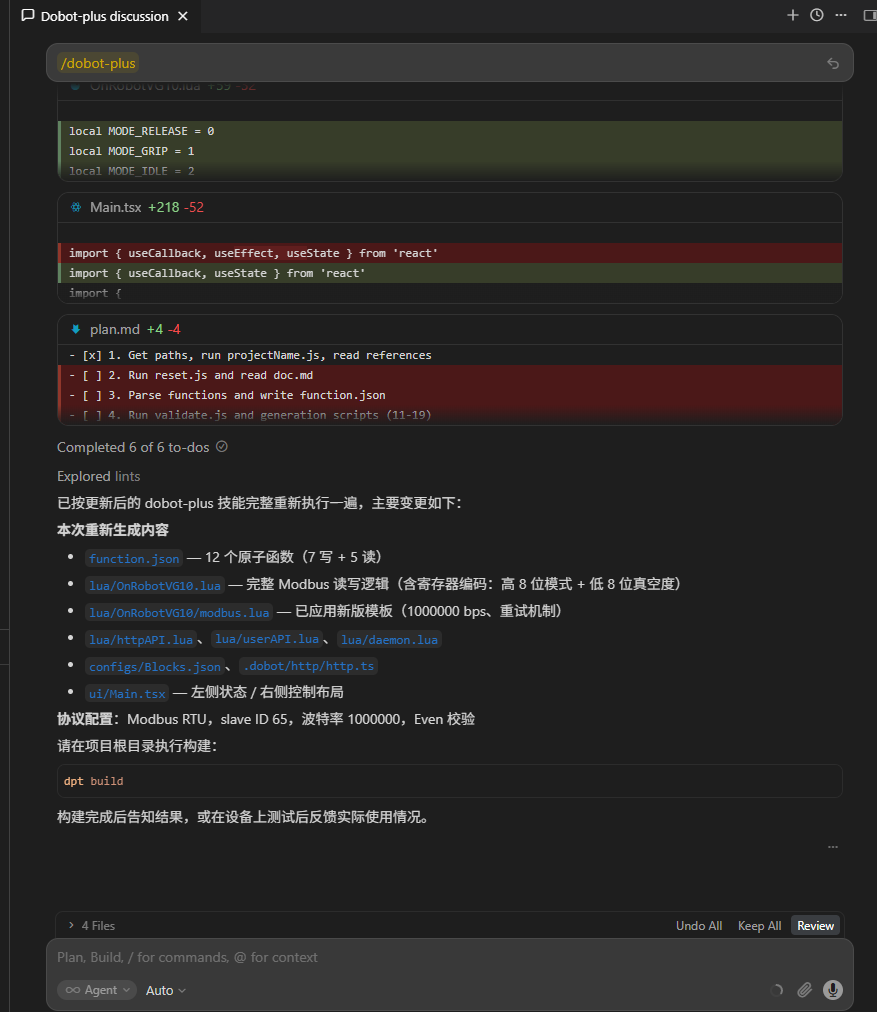
2. Review
| Path | Description |
|---|---|
function.json | Protocol + slaveID, baud rate |
lua/*.lua | Modbus logic |
ui/Main.tsx | Control UI |
Check protocol.slaveID (1 or site value), SetForce → 257, SetPosition → 259, init before motion in lua/[project-name].lua.
3. Local debug (optional)
dpt dev
- No: UI only
- Yes: Real device via
httpAPI.lua→ Modbus → AG-95
Build & import
dpt build
Import zip from output/ in DobotStudio Pro. See Quick Start — Build & Use.
FAQ
Missing doc.md
File must be in project root with full protocol and registers.
Wrong slave ID
Factory default 1; if changed via 0x0302, match in doc.md and function.json.
No response to force/position
- Init done (
0x0200= 1, blue LED) - RS485 wiring and 24V power
- Baud/parity match
Modbus errors
Default 115200, no parity; check dpt.json IP; avoid address conflicts.
State not updating
0x0201 = 2 means object gripped; avoid polling too fast during writes.
Poor Agent results
- Confirm on-site communication parameters match the manual
- Review
doc.mdfor ambiguous or contradictory descriptions - Check the Agent model: in VS Code Copilot use GPT-5.4 or newer; in Cursor, Auto mode generally works well