Agent Skill: DH PGE50
This example shows how to use the
dobot-plusskill for DH-Robotics PGE industrial electric grippers (PGE-50). PGE supports Modbus RTU and IO; this guide focuses on Modbus RTU. Preparedoc.mdand invoke/dobot-plusin the IDE.
Workflow
Environment Setup
| Dependency | Version / Notes |
|---|---|
| Node.js | v20+ |
| IDE | Agent Skills (e.g. Cursor) |
| @dobot-plus/cli | dpt |
| @dobot-plus/skill | /dobot-plus |
npm install -g @dobot-plus/cli @dobot-plus/skill@latest
See Agent Skill.
Preparation
1. Create a plugin project
dpt create
Example:
$ dpt create
? Please input plugin name: DhPGE50
? Please input plugin description: DH-Robotics PGE-50 electric gripper plugin
? Please input plugin version: 1-0-0-test
? Please input device IP: 192.168.5.1
cd DhPGE50
2. Write device document doc.md
Required: Modbus parameters, registers (including speed), atomic functions.
Default communication:
| Setting | Default |
|---|---|
| Slave ID | 1 |
| Baud rate | 115200 |
| Data bits | 8 |
| Parity | None |
| Stop bits | 1 |
Slave ID range 1–247; configurable via 0x0302 / 0x0303. Document actual values in use.
Product variants
Same register map; pick the manual that matches your hardware:
| Type | Description | Manual |
|---|---|---|
| External controller (Split) | Gripper + external box; RS485 to box | PGE external controller short manual (EN) |
| Integrated drive | Motor and driver in gripper body | PGE integrated short manual (EN) |
Model number indicates max gripping force (e.g. PGE-50). Follow blue/yellow wire marking diagrams—do not guess wiring if labels are missing.
Core registers
Compared to AG series, PGE adds Speed at 0x0104:
| Address | Register | Access | Notes |
|---|---|---|---|
| 256 (0x0100) | Initialization | R/W | Write 1 or 0xA5 |
| 257 (0x0101) | Force | R/W | 20–100 (%) |
| 260 (0x0104) | Speed | R/W | 1–100 (%) |
| 259 (0x0103) | Position | R/W | 0–1000 (‰) |
| 512 (0x0200) | Initialization State | R/O | 0/1/2 |
| 513 (0x0201) | Gripper State | R/O | 0–3 |
| 514 (0x0202) | Current Position | R/O | ‰ |
Typical flow: init → set force → set speed (optional) → set position → read status.
Example doc.md:
# PGE Integrated Gripper — Software Reference

## Overview

PGE industrial parallel grippers support **Modbus-RTU (RS485)** and **IO mode**. Control **position, force, and speed** with status feedback.

---

## 1. Communication (RS485 Modbus-RTU)

| Parameter | Default |
|-----------|---------|
| Device ID | 1 |
| Baud rate | 115200 |
| Data bits | 8 |
| Stop bits | 1 |
| Parity | None |

> Function codes: `03`, `04`, `06`, `10`

---

## 2. Registers

### 2.1 Control (R/W)

| Function | Address | Notes | Range |
|----------|---------|-------|-------|
| Initialize | 0x0100 | 0x01 homing; 0xA5 full cal | write |
| Force | 0x0101 | Closing force (%) | 20–100 |
| Position | 0x0103 | Target (‰) | 0–1000 |
| Speed | 0x0104 | Motion speed (%) | 1–100 |

### 2.2 Status (R/O)

| Function | Address | Values |
|----------|---------|--------|
| Init state | 0x0200 | 0=not init; 1=OK; 2=in progress |
| Grip state | 0x0201 | 0=moving; 1=at pos; 2=gripped; 3=dropped |
| Actual position | 0x0202 | ‰ |

### 2.3 Configuration (R/W)

| Function | Address | Notes |
|----------|---------|-------|
| Save | 0x0300 | Write 1 → save to Flash |
| Init direction | 0x0301 | 0=open; 1=close |
| Device ID | 0x0302 | 1–247 |
| Baud rate | 0x0303 | 0=115200 … 5=4800 |
| Stop bits | 0x0304 | 0/1 |
| Parity | 0x0305 | 0/1/2 |
| Auto init on power | 0x0504 | 0/1 |

---

## 3. Examples

### Init

```text
TX: 01 06 01 00 00 01 49 F6
RX: 01 06 01 00 00 01 49 F6
```

### Force 30%

```text
TX: 01 06 01 01 00 1E 59 FE
```

### Position 500‰

```text
TX: 01 06 01 03 01 F4 78 21
```

### Speed 50%

```text
TX: 01 06 01 04 00 32 48 22
```

### Read grip state (gripped = 02)

```text
TX: 01 03 02 01 00 01 D4 72
RX: 01 03 02 00 02 39 85
```

### Save parameters

```text
TX: 01 06 03 00 00 01 48 4E
```

---

## 4. IO mode (summary)

NPN inputs select parameter groups 1–4; outputs mirror grip states (moving / at position / gripped / dropped). See full manual for pin tables.

---

## 5. Development notes

- **Initialize** before control (`0x01` or `0xA5`)
- Consider **save** (`0x0300`) after parameter changes
- Do not send motion during init (~0.5–3 s)
- ID/baud changes may require power cycle
Atomic functions: Initialize, SetForce, SetSpeed, SetPosition, GetGripperState, GetCurrentPosition.
Checklist
| Register | Example | Notes |
|---|---|---|
| Initialization (0x0100) | 1 / 0xA5 | Normal / full |
| Force (0x0101) | 30% | 01 06 01 01 00 1E |
| Speed (0x0104) | 50% | 01 06 01 04 00 32 |
| Position (0x0103) | 500‰ | 01 06 01 03 01 F4 |
| Gripper State (0x0201) | R/O | 2 = gripped |
Generate with AI
From DH-Robotics PGE (e.g. PGE-50) manual, produce Dobot+ doc.md in English.

Include: protocol (slaveID=1, 115200 8N1); registers 0x0100/0x0101/0x0104/0x0103/0x0200–0x0202;
ranges Force 20–100%, Speed 1–100%, Position 0–1000‰;
flow: init → SetForce → SetSpeed (opt) → SetPosition → read state;
functions: Initialize, SetForce, SetSpeed, SetPosition, GetGripperState, GetCurrentPosition;
note external vs integrated hardware if applicable.

---
Source:
[Paste manual]
Verify: 0x0104 present, slave ID/baud, init flow, atomic functions. Save doc.md → /dobot-plus.
3. Hardware
- RS485 to robot or USB–485 adapter; external type: RS485 on control box
- 24V DC, common ground
- Wire per blue/yellow marking diagrams
- Match
dpt.jsonIP
Initialize after power-up (blue LED solid) before force/speed/position commands.
Using the Agent Skill
/dobot-plus
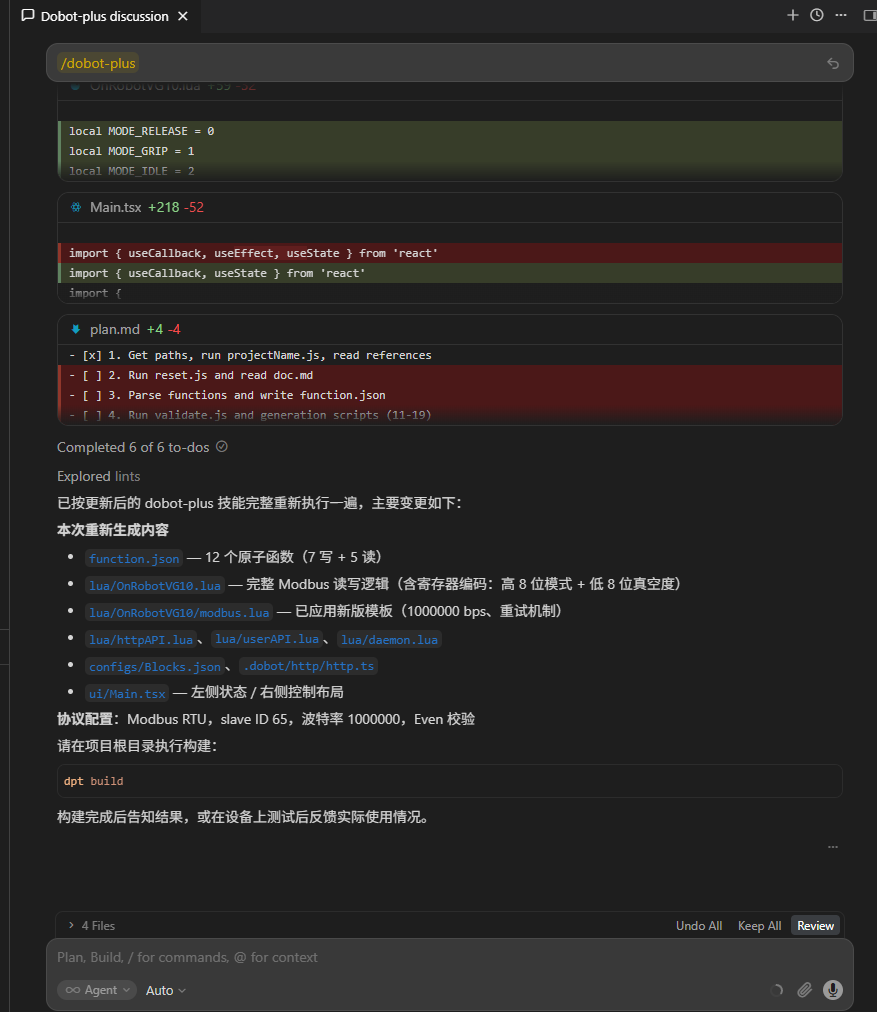
Check:
SetSpeed→ 260 (0x0104) (not AG’s reserved0x0102)protocol.slaveID= 1 (or site value)- Init logic in
lua/[project-name].lua
Local debug (optional)
dpt dev
Build & import
dpt build
See Quick Start — Build & Use.
FAQ
Missing doc.md
Root doc.md with protocol, registers (including Speed), functions.
No SetSpeed in output
Document 0x0104 in doc.md; AG docs lack speed and must not be reused as-is.
No motion response
- Initialized (
0x0200= 1) - RS485 / 24V / wiring
- External type: RS485 on controller box
Modbus errors
115200, no parity; unique slave ID; 1–2 s no response after save to 0x0300 is normal.
Mixed with AG docs
AG-95 has no 0x0104. Use PGE register table from PGE manuals.
Poor Agent results
- Confirm on-site communication parameters match the manual
- Review
doc.mdfor ambiguous or contradictory descriptions - Check the Agent model: in VS Code Copilot use GPT-5.4 or newer; in Cursor, Auto mode generally works well